
Widget apps overview
A widget app is made of two pages, the widget shown on the stream and its settings sidebar, and is hosted by evmux from a zip file.
What a widget app is
You can use the SDK to develop an evmux app, a widget app, that communicates with the scenes and streams it is installed on and can access and manage them.
The two parts of a widget app
Each widget app is built from two key components:
- Widget: the main component, displayed on the stream.
- Settings: the settings sidebar, which lets the user customize, control and work with the widget.
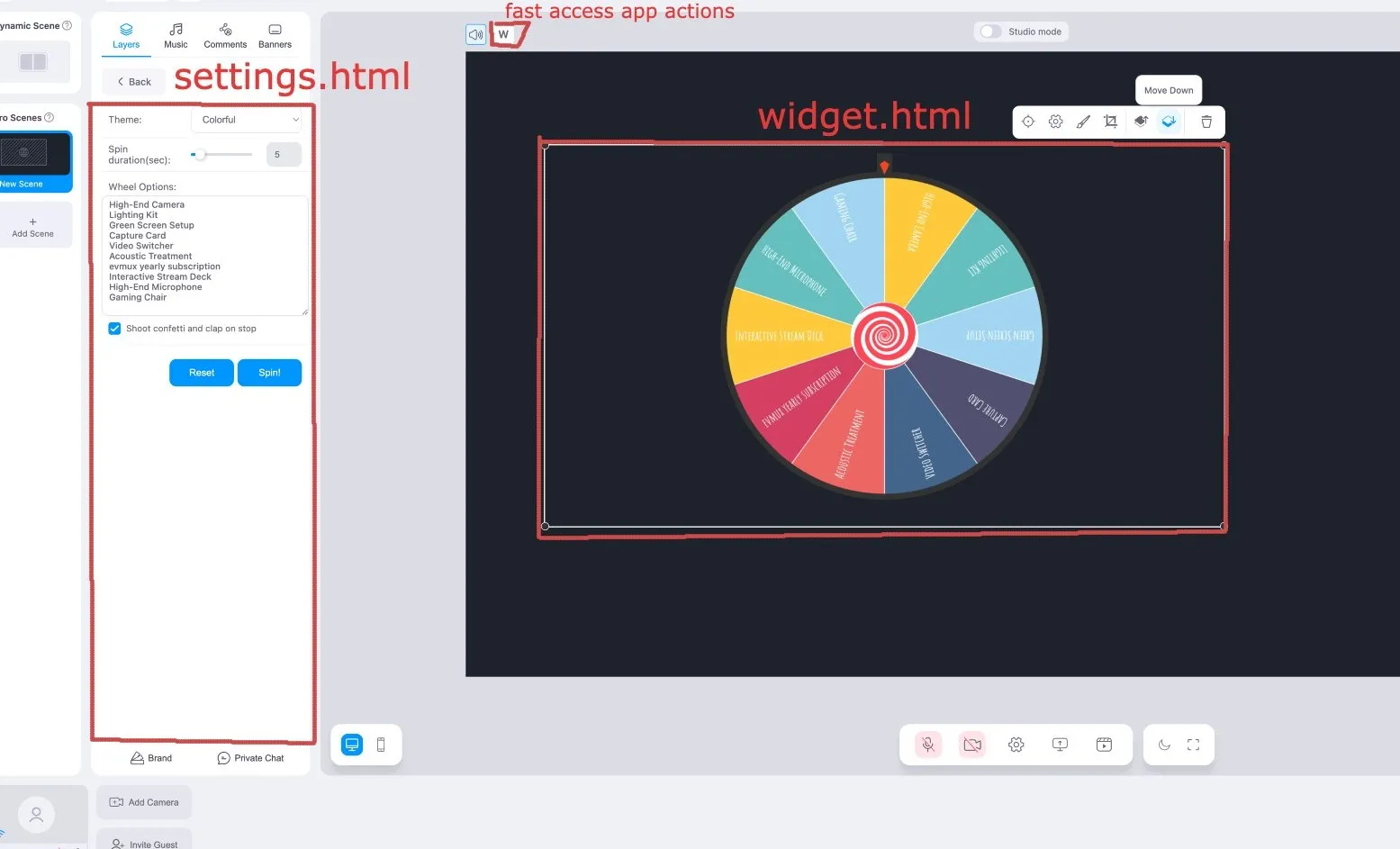
Each component is its own HTML page: widget.html and settings.html. Both use the SDK, and they stay in sync through the app’s settings object and through events.
An app can also add fast action buttons above the stage, so the host can trigger an action, such as spinning the wheel, without opening the settings. See setFastActionButtons.
Hosting
There are two submission options for widget apps:
| Option | How it works |
|---|---|
| evmux hosting | Upload a zip file that has settings.html and widget.html. Other related files can be included too. |
| Self hosting (deprecated) | You provide the URLs of your settings page and your widget page. |
Use evmux hosting for new apps.
Next steps
- Create your app in the Developer Center.
- Learn the lifecycle every component follows.
Stuck, or found a mistake in these docs? Tell us.