What's New

Stay updated with the latest features and improvements

October 20, 2026

There’s an AI assistant in your studio now. Ask it anything.

Ask anything about the studio in plain language, like how to go live or where a setting is. It answers in a few steps and highlights the right button right in the studio. It only explains, never changes anything. Look for the purple Ask me anything

October 15, 2026

Your camera, any character

Swap your camera for a character. 300+ avatars that follow your face, voice and moves, live. Settings β†’ Avatar / VTuber.

October 11, 2026

Your best moments, clipped by AI

Your recordings now come with their best moments picked out. Watch, export as a short, or fine-tune in the trimmer, all in a click.

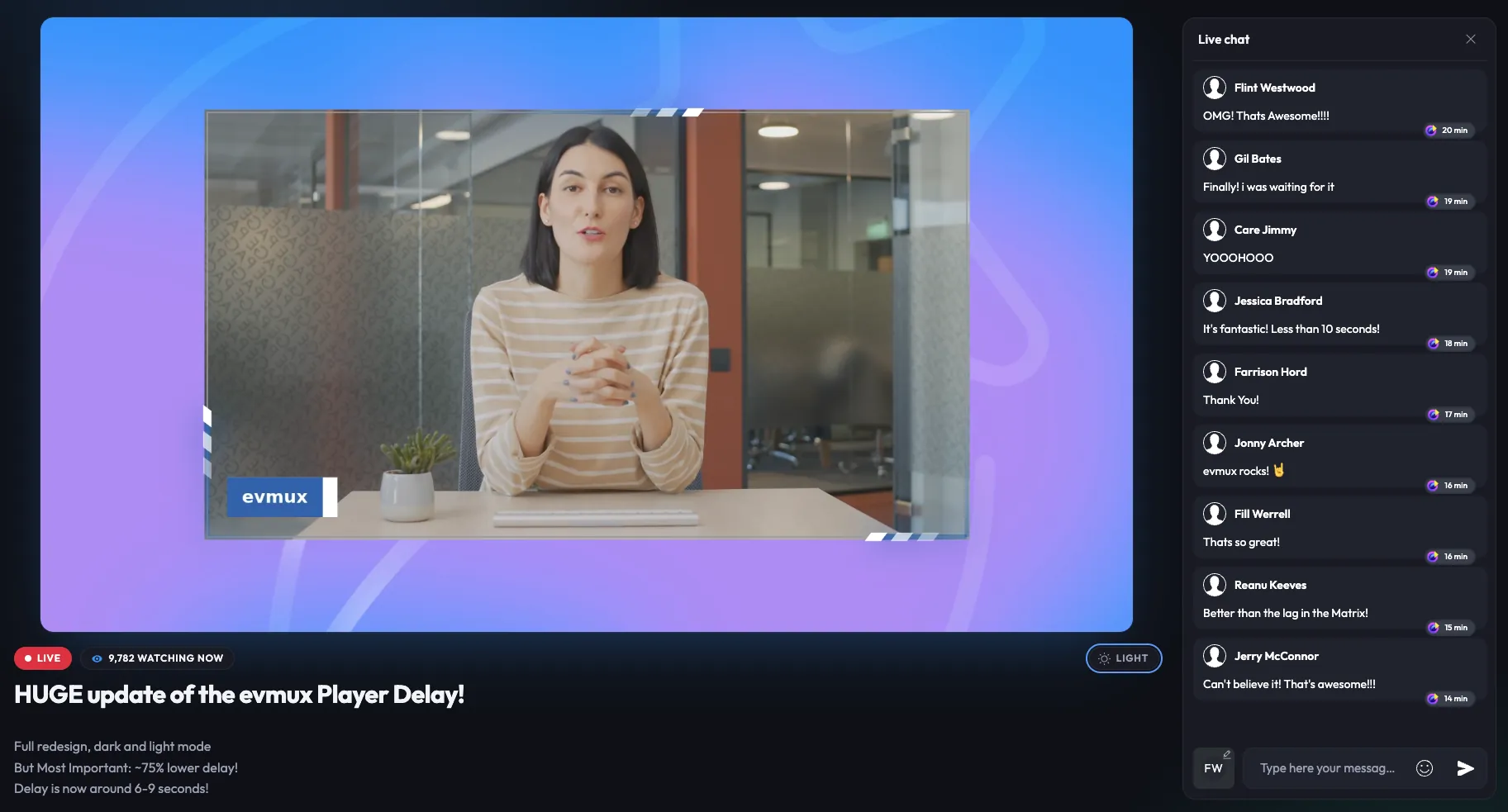
evmux Player: new design, 75% lower latency
October 2, 2026

evmux Player: new design, 75% lower latency

Your stream now reaches viewers in 6 to 9 seconds instead of ~40. The player page has a new design: a big video stage, a clean title block, live status and viewer count, chat as a side panel, and a dark/light switch that remembers the viewer's choice!

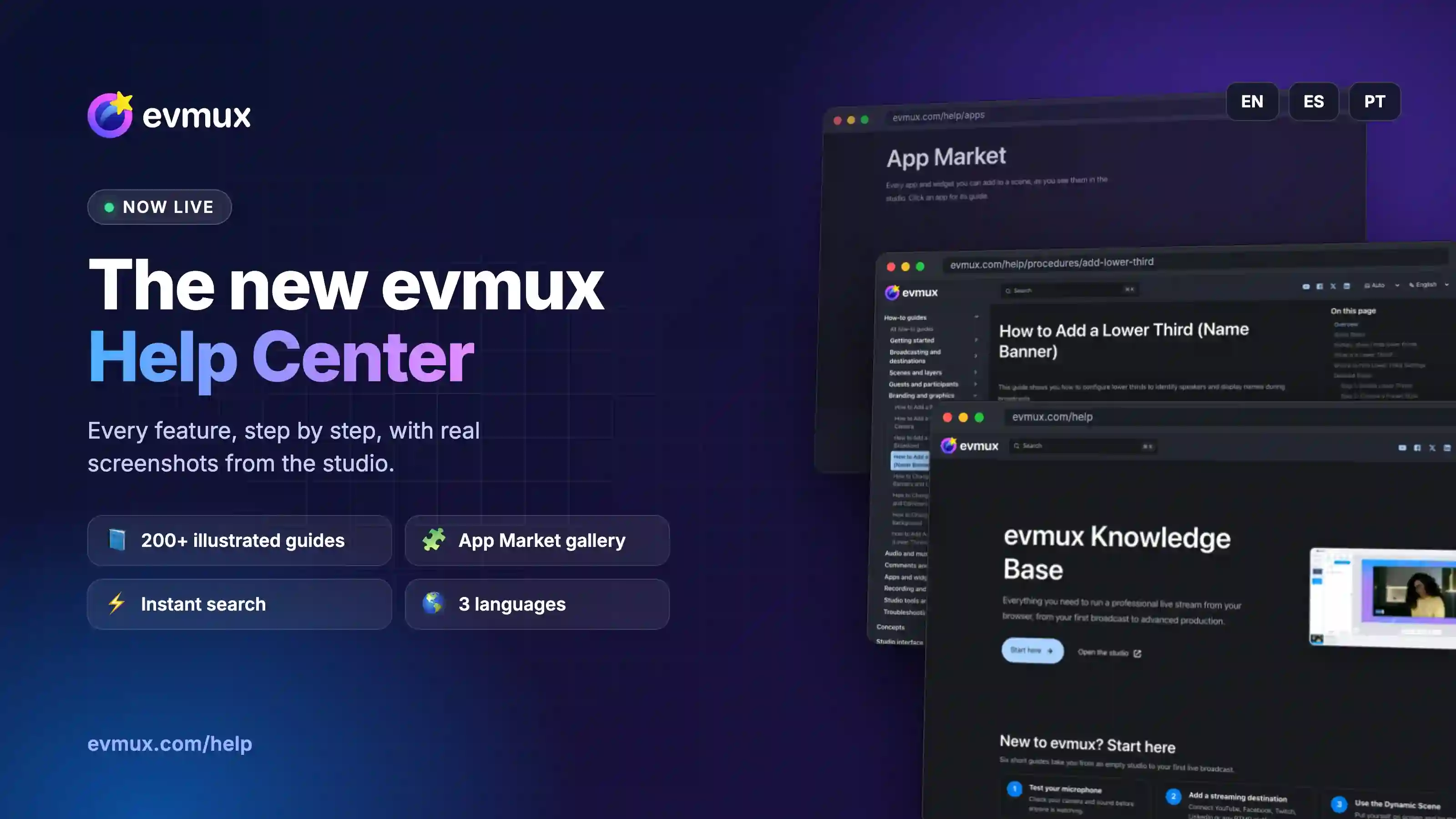
πŸ“š The new evmux Help Center is live!
September 29, 2026

πŸ“š The new evmux Help Center is live!

Whether it's your first stream or your five hundredth, everything you need to know about evmux is now in one place

September 24, 2026

Schedule your live on X

X now supports scheduled live streams - and we've got you covered. Tick Schedule for later on your X destination, set the time and a thumbnail, and evmux creates the broadcast and announces it on your profile. Go live when you're ready, connect to a broadcast you already scheduled on X, and reply to X chat straight from the Comments tab. Requires X Premium.

September 23, 2026

New animated frames: Comet, Ribbon, Electric, Vines and Sparkle

Five new frames that move, drawn live around your cameras, guests, screen shares and media.

Comet sends a streak of light racing around the edge. Ribbon runs your text, like LIVE or your handle, along a band. Electric crackles with arcs of light. Vines grow from the corners, bloom and wither. Sparkle adds pearls, twinkles and floating hearts.

Every frame follows your layer's shape, from a sharp square to a full circle, and each one has its own colors and settings.

Pick one in the Brand tab to frame everyone at once, or click the Frame icon on any layer in a Pro scene. Available in all plans.


September 1, 2026

AI images: 10Γ— faster, and better looking

We've upgraded the engine behind AI image and object generation in evmux.

Generation that used to take 25 to 30 seconds now finishes in just a few.

And the results are better across the board: sharper details, more natural lighting and color, closer adherence to your prompt, and cleaner cutouts for generated objects.

Same panel, same prompts. Better pictures, a lot sooner. It's live now in your studio.

July 13, 2026

Edit Destinations While You're Live

Your destinations are no longer locked during a broadcast. Add new channels mid-stream, stop single destinations, or edit titles & descriptions on the fly - all without interrupting your live. No restart, no downtime, your viewers never notice a thing.

June 18, 2026

Dual streaming - go live once, reach every screen

Dual streaming β€” go live in landscape and portrait simultaneously from a single broadcast. Reach widescreen and vertical audiences at once, with recordings and captions generated for both orientations automatically. One go-live, every aspect ratio.

March 31, 2026

Free Media Stock is Here! 1000+ Free Assets for Your Stream

We just added 1000+ free backgrounds, overlays, transitions, music & more to evmux. No attribution needed. Just drag & drop into your stream. 🎬✨

March 30, 2026

A Huge Countdown Video Blast is live!

Right now! In your scene templates and public assets!

January 27, 2026

🎬 New Frames Are Here

evmux just leveled up how your feeds look on screen.

Meet New Frames, a powerful way to visually wrap any video feed with style and precision.

Choose from solid colors, smooth gradients, or eye-catching glowing effects, and bring everything to life with animation.

The best part?

Frames are perfectly bound to the exact shape of the feed.

More polish. More personality. Zero compromises.

November 21, 2025

πŸš€ New in evmux! - Folders

We just made organizing your media a whole lot easier πŸŽ‰

You can now create folders directly in the media browser - perfect for keeping your videos, images, and overlays tidy and easy to find.

No more endless scrolling or hunting for that one clip πŸ‘€

Group your assets by show, project, or team - your workspace, your way.

Try it out now and keep your evmux studio cleaner than ever 🧹

October 21, 2025

πŸš€ New Feature Alert: Remote Settings in evmux!

Hosts, take full control of your live sessions like never before. With our new Remote Settings feature, you can now manage your guests and co-hosts in real-time:

πŸŽ₯ Switch cameras

πŸŒ„ Change virtual backgrounds

πŸŽ™οΈ Mute/unmute microphones

⚑ And much more

No more back-and-forth or technical delays - everything you need to keep your stream smooth and professional is right at your fingertips.

Check out our quick demo video below to see it in action! 🎬

February 21, 2025

Movie Credits App!

Showcase your contributors in style with Evmux's Movie Credits widget! Choose between a classic vertical scroll or the iconic Star Wars-style crawl. Fully customizable for a cinematic touch to your live streams!

October 15, 2024

Import / Export Scenes

The Import/Export Scenes feature in Evmux lets you easily share and transfer custom scenes between projects or accounts. When exporting a scene, you will see a unique identifier that can be used by others or yourself to import the scene into different projects or accounts. This makes collaboration and reuse of scene setups quick and effortless, without the need to recreate them from scratch.

June 20, 2024

Viewers Count Widget

Stay informed and in control of your audience engagement with the Viewers Count App,
your go-to solution for real-time viewer tracking across popular platforms like YouTube and Facebook.

June 10, 2024

Live Text App

Introducing LiveText app: Transform your live streams with synchronized text. Style text with rich formatting, synchronize selections, scroll together, and create interactive experiences. Easy integration for content creators, educators, and presenters. Engage your audience like never before.

May 31, 2024

TradingView Crypto Heatmap

Elevate your live stream with TradingView Crypto Heatmap Widget! This dynamic, real-time overlay showcases the performance of various cryptocurrencies using color-coded heatmap visuals. Easily spot the top gainers, losers, and market trends within the crypto space at a glance. Ideal for crypto enthusiasts, traders, and analysts, the Crypto Heatmap Widget provides a clear and intuitive understanding of the ever-changing cryptocurrency market. Add this visually engaging tool to your broadcast to keep your audience informed and captivated with the latest crypto market dynamics. Stay ahead in the crypto world with TradingView Crypto Heatmap Widget.

May 31, 2024

TradingView Stock Heatmap

Introducing TradingView Stock Heatmap Widget for your live stream! This vibrant, real-time overlay provides a comprehensive view of market performance, highlighting stocks with color-coded heatmap visuals. Instantly identify the top gainers, losers, and market trends at a glance. Perfect for financial analysts, traders, and market enthusiasts, the Stock Heatmap Widget makes it easy to understand market movements and sector performance. Enhance your broadcast with this visually engaging tool, offering your audience a clear and intuitive way to stay updated on the latest market dynamics. Keep your viewers informed and captivated with TradingView Stock Heatmap Widget.

May 31, 2024

TradingView MiniChart

Add a touch of sophistication to your live stream with TradingView Mini Chart Widget! This compact, real-time chart provides a snapshot of stock prices, market trends, and financial data, updating continuously to keep your audience informed. Perfect for highlighting key metrics without overwhelming your screen, the Mini Chart Widget is ideal for financial analysts, traders, and market enthusiasts. Enhance your broadcast with this sleek, informative tool and deliver essential market insights in a visually appealing format. Keep your viewers engaged and informed with our Mini Chart Widget.

May 31, 2024

New TradingView Stocks Ticker

Introducing TradingView Stock Ticker Widget for your live stream! This dynamic overlay provides real-time updates on stock prices, market indices, and key financial metrics. Keep your audience informed with the latest trading data, showcasing top-performing stocks and market movements as they happen. Perfect for financial analysts, traders, or anyone interested in the stock market, this widget adds a professional touch to your stream, ensuring your viewers never miss a market beat. Enhance your live broadcast with our Stock Ticker Widget and deliver the critical financial information your audience needs.

February 8, 2024

New Camera Frames Is Released!

Enhance your live stream with evmux's new frames.

On the "Brand" section, choose your default frame or edit frames for each participant on the Pro Scene

October 5, 2023

A Brand New Giveaway Tool!

A new Giveaway tool has been added to the store for increased interactions of your viewers!

October 5, 2023

Overlay Animations Widget

Utilizing the new overlay animations widget, you can enhance your stream by responding to various elements with stunning animations.